


Juniper Networks JNP-100G-AOCBO-50M Compatible 100G QSFP28 4 x 25G NRZ to 4 x 25G SFP28 NRZ Active Optical Breakout Cable, 50m (164ft)
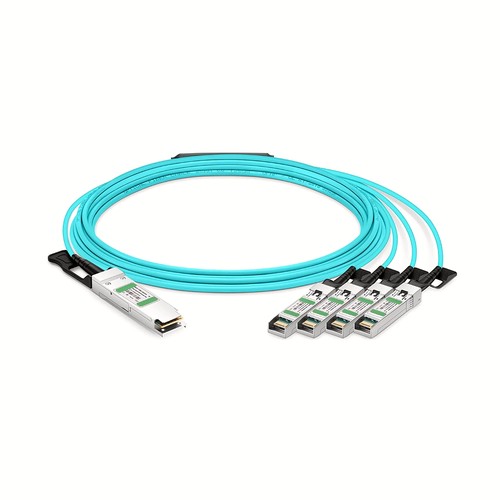
The JNP-100G-AOCBO-50M compatible assembly is a 100G AOC cable for Juniper Networks hosts, built in 50m (164ft) with QSFP28 to 4x SFP28. It serves as one complete direct-attached link, while the compatibility and diagnostic checks below address the host-specific identification needed in a mixed-equipment environment.
OEM Part Number: JNP-100G-AOCBO-50MHT Part Number: JNP-100G-AOCBO-50M
Product Highlights
- Compatible alternative to Juniper Networks JNP-100G-AOCBO-50M
- 100G connectivity at 100Gbps
- Interface configuration: QSFP28 to 4x SFP28
- Fixed length and part number: 50m (164ft), JNP-100G-AOCBO-50M
- Cable construction: Breakout AOC
- Maximum power consumption: 2.2W (QSFP28 End)0.8W (SFP28 Per End)
- Minimum bend radius: 30mm
- Operating temperature: 0 to 70°C (32 to 158°F)
Specifications
| HT Part Number | JNP-100G-AOCBO-50M |
|---|---|
| Juniper Networks Compatible | JNP-100G-AOCBO-50M |
| Manufacturer | HT |
| Form Factor | QSFP28 to 4x SFP28 |
| Max. Data Rate | 100Gbps |
| Cable Length | 50m (164ft) |
| Cable Type | Breakout AOC |
| Wavelength | 850nm |
| Minimum Bend Radius | 30mm |
| Transmitter Type | VCSEL |
| Receiver Type | PIN |
| Max. Power Consumption | 2.2W (QSFP28 End)0.8W (SFP28 Per End) |
| Modulation Format | QSFP28-4x 25G-NRZ SFP28-1x 25G-NRZ |
| CDR (Clock and Data Recovery) | TX & RX Built-in CDR |
| Jacket Material | OFNP |
| DDM/DOM | Supported |
| Commercial Temperature Range | 0 to 70°C (32 to 158°F) |
| Protocols | QSFP28 MSA, SFP28 MSA |
Juniper Deployment Reference
Juniper platform documentation distinguishes straight QSFP28 DAC or AOC connections from DACBO and AOCBO breakout operation. On channelized systems, the host port must be configured for the required breakout mode. Match this HT compatible cable to the exact Juniper part number and the intended platform configuration.
Mixed-Vendor Network Operation
A mixed-vendor link should be documented at both ends, not treated as one generic connection. Confirm which OEM identity each host expects and whether the two ends use the same compatibility requirement. The related brand links below help locate equivalent-length assemblies, while the physical form factor and lane arrangement must still agree across the complete path. For this assembly, the minimum bend radius is 30mm; the stated power consumption is 2.2W (QSFP28 End)0.8W (SFP28 Per End); the jacket material is OFNP.
Signal and Lane Configuration
The listed modulation format is QSFP28-4x 25G-NRZ SFP28-1x 25G-NRZ. Both host interfaces must be configured for the same aggregate rate and lane arrangement. A connector that fits mechanically does not by itself guarantee that the remote port supports this encoding or breakout mode.
Power and Thermal Planning
The rated power consumption is 2.2W (QSFP28 End)0.8W (SFP28 Per End). Include this load in the host-port power and thermal budget, especially in densely populated switches. Maintain front-panel clearance and do not bundle the cable so tightly that it obstructs airflow around the connectors.
Cable Construction and Routing
This assembly uses OFNP jacket, minimum bend radius 30mm. These mechanical characteristics affect how the cable should be dressed behind the equipment. Avoid sharp edges, excessive ties and repeated tight bends close to the connector boots.
Network and Protocol Considerations
The intended application is determined by the host interface and protocol support. Listed interface and protocol references include QSFP28 MSA, SFP28 MSA. Confirm that the host firmware and port configuration support the same operating mode.
Breakout Port Mapping
The QSFP28 to 4x SFP28 configuration divides the high-speed interface into multiple lower-speed connections. Verify the upstream lane assignment, downstream port speeds and breakout setting on the host before connecting the assembly. Each branch must attach to the correct remote interface.
Integrated Optical Assembly
The optical engines and fiber are permanently integrated into this AOC. There are no detachable optical modules to clean or exchange. Handle the complete assembly by its connector housings and cable, and keep both ends matched to the same interface specification.
Length Selection and Installation Planning
For this 50m (164ft) version, prepare the destination pathway before connecting either end. A longer assembly can cross separated equipment positions, but its weight and service slack must remain supported without blocking airflow. Handle the integrated optical cable and both optical engines as one factory-terminated product and never pull a connector into position by the cable. The next shorter verified assembly is JNP-100G-AOCBO-30M at 30m (98ft), which is the better comparison when the managed route leaves substantial unused cable.
Position Within the Length Range
JNP-100G-AOCBO-50M is the longest of 11 verified length options in this family. Compared with JNP-100G-AOCBO-30M at 30m (98ft), it provides 20m of additional reach for a longer vertical drop, a wider rack or an adjacent-cabinet route. Confirm that the complete path requires this length, because unused slack still needs supported, bend-safe storage.
Juniper Networks Compatibility and Factory Testing
Testing addresses the brand-specific identification as well as the operating link and available diagnostics. The same physical cable family can require a different host identity for another equipment vendor, so the intended platform should be supplied when a deployment combines multiple brands or unusual hardware revisions. Where supported by the host, receive activity and diagnostic indications are reviewed together with the established link.
Ordering Information
For mixed-vendor projects, identify the equipment at both ends along with the OEM reference, length and quantity. Order each compatibility version under its own part number. If spare assemblies are required, list them separately so labels and test records remain unambiguous. This page’s fixed configuration is 50m (164ft); another length must be quoted under its corresponding part number.
Quality Assurance and Packaging
Both ends are inspected and the complete assembly is powered up for a functional check before packing. Connectors are protected individually and the cable is secured without tight bends. Optional labels can distinguish host brand, OEM reference and length for easier spares management. Volume orders can include customer references on the labels and carton list.
Frequently Asked Questions
Is this an original Juniper Networks cable?
No. It is an HT-manufactured compatible alternative for equipment that specifies Juniper Networks JNP-100G-AOCBO-50M.
How should an unused assembly be stored?
Protect both connector ends, keep the cable in a loose bend-safe coil and retain its part-number label so the length and compatibility identity remain traceable.
Can different brands be connected with the same assembly?
Only where both hosts explicitly support the complete interface and compatibility arrangement. Document each end and select the appropriate brand-specific product when required.
Does this order code cover multiple lengths?
No. JNP-100G-AOCBO-50M refers here to 50m (164ft). Every other verified length has a separate part number and page in the length list.
Shipping and Lead Time
Available stock is generally dispatched within one to three working days after order confirmation, with production lead times advised for larger quantities. Delivery can be arranged by courier, air freight or sea freight, and goods may instead be handed to an appointed forwarder or shipped on the customer’s courier account.
Transceivers
Malaysia Fiber Optic Supplier
Malaysia Fiber OpticsFactory Address: Block 5, Wangtang Industrial Park,Nanshan Area, Shenzhen,China
Malaysia Office: 68000 Ampang,
Selangor, MYhttps://www.fiberoptic.com.my